Reliable contact migration from outlook to VCF
Contact migration from Microsoft Outlook becomes straightforward and dependable with the right solution. The MSG to VCF Converter by Softaken offers an effective way to transform Outlook MSG contact files into the widely recognized VCF (vCard) format. This universal format ensures easy import into mobile devices, CRM systems, and various email clients.
Support for bulk conversion adds value for users handling many contacts at once. Compatibility of the VCF format across platforms makes the tool practical for both organizational and individual use cases. Installation is simple, with no Outlook dependency, while the interface promotes smooth interaction and preserves data integrity throughout the process.
Workflow with step-by-step guidance
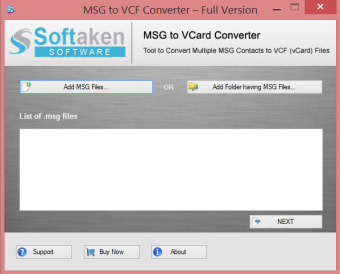
The MSG to VCF converter features a streamlined interface that supports users of all experience levels. Its organized layout includes clearly marked controls and intuitive menus for effortless navigation. A clearly placed Add Files button simplifies file selection, and a dynamic file list helps users track their input with confidence.
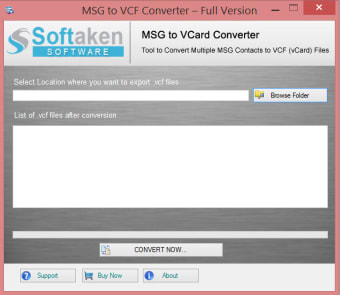
Each step of the process is structured to reduce confusion. Users select MSG files, choose an output location, and complete the task through clearly indicated actions. This guided workflow minimizes the learning curve, making the tool approachable, productive, and efficient.
Smart features that enhance compatibility and control
Batch processing stands out as a defining strength of the converter, allowing the handling of extensive contact lists without manual repetition. Conversion speed depends on system performance, but the software scales well across different environments. Built-in preview functionality allows users to verify contact details in advance, reducing errors before export.
Support for vCard formats v2.1, v3.0, and v4.0 ensures adaptability to a range of applications. Duplicate contact detection helps maintain data clarity, while the integrated MSG viewer offers helpful context during preparation. While the tool doesn’t directly integrate with email clients, the resulting VCF files import seamlessly into platforms like Outlook and Thunderbird.
Practical, accessible, and versatile contact conversion
The MSG to VCF Converter by Softaken delivers a robust and accessible solution for managing contact transfers. With batch processing, flexible format support, and real-time preview, the software balances technical capability with ease of use.
Its interface is thoughtfully designed to simplify complex tasks, requiring minimal setup and interaction. Compatibility with a wide range of systems makes it well-suited for both everyday users and IT professionals. Whether for archiving, backup, or migration purposes, this converter ensures dependable, high-quality results—without needing Microsoft Outlook.